Babelarc vs Google Lens (Desktop) — Desktop OCR Translation for Gamers
Google Lens rules phone image translation — but Windows has no native Lens app. Here's the 5-second decision tree for your gamer use case.
↓ Download Babelarc · No installerWhat Google Lens is — and what the desktop workflow actually looks like
Google Lens is Google's image-recognition + translation tool, launched in 2017. It nails point-and-translate from a phone camera — free, accurate, 100+ languages. On mobile it's basically synonymous with "image translation."
On Windows desktop the story is different — Google Lens has no native desktop app. Desktop users get two paths:
- "Search image with Google Lens" inside Chrome — works only on web images, not on games / VNs / Discord / any other desktop app window.
- Screenshot → upload to lens.google.com — universal but every cycle costs you: ① PrtScn or Win+Shift+S → ② switch to browser → ③ open lens.google.com → ④ paste / upload → ⑤ wait for translation → ⑥ switch back to the game. Typical 5-8 seconds per lookup, with constant window switching.
The bottleneck isn't Lens's translation quality (that's fine). It's that desktop gamers need hotkey + floating overlay + zero window switching, and Google Lens on the desktop can't give you that.
Babelarc vs Google Lens (Desktop) — full feature comparison
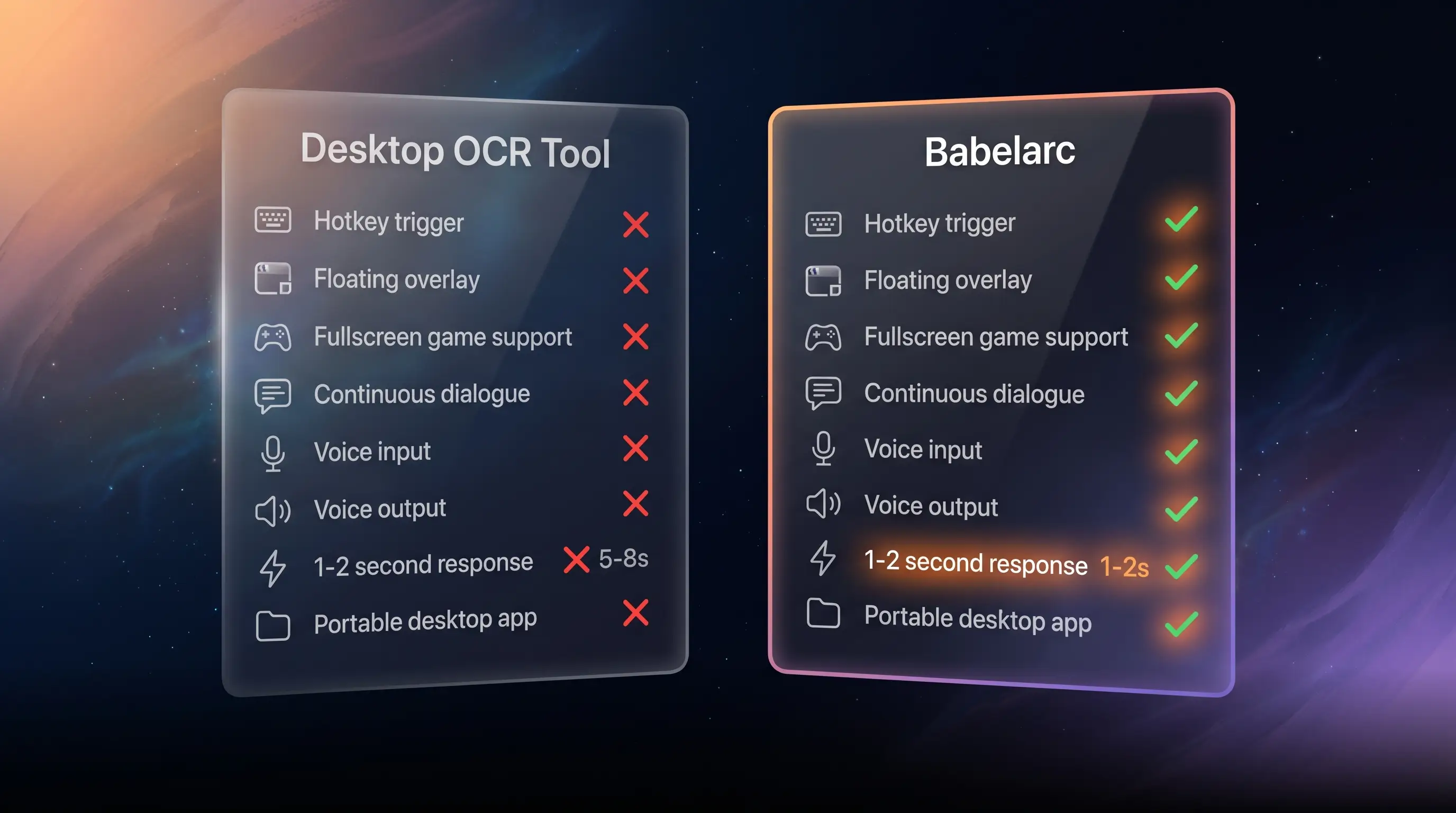
| Capability | Google Lens (Desktop) | Babelarc |
|---|---|---|
| Native desktop app | ❌ Web only / Chrome embed | ✅ Windows portable, no installer |
| Screenshot OCR translate | ✅ (must upload to lens.google.com) | ✅ Flash Translate (Ctrl + Alt + S drag) |
| Global hotkey trigger | ❌ | ✅ Custom hotkey |
| Fullscreen game support | ⚠️ Must switch to browser | ✅ Floating overlay, no window switch |
| Continuous dialogue auto-follow | ❌ Single-shot only | ✅ Chat-Box Translate (region loop) |
| Cross-language voice in (hear them) | ❌ | ✅ Live Interpret |
| Cross-language voice out (let them hear you) | ❌ | ✅ Cross-Language Mic |
| Typical latency | 5-8 seconds (incl. window switch / upload) | 1-2 seconds (direct overlay) |
| Privacy / data retention | Uploaded to Google, per Google Privacy Policy | Use-once at client; AI Gateway retention disclosed publicly |
| Price | Free (ads + data) | Free tier + subscription plans |
The table tells the story: Google Lens Desktop is a universal screenshot-translate one-trick; Babelarc is the four-tool desktop gamer kit. Two different design goals.
Which one fits which scenario
Pick Google Lens when
- Phone: translate a menu / sign / product label — Lens's home turf, unbeatable.
- Browser: occasionally translate one image inline — Chrome right-click "Search with Lens" does the job.
- Desktop: one-off screenshot lookup — uploading to lens.google.com is fine for a single image.
Pick Babelarc when
- Playing foreign-server MMOs / Lost Ark / KR LoL — combat-time party chat needs hotkey + overlay, can't switch windows mid-fight (a switch = a wipe).
- Reading foreign-language VNs / galgames / IF — continuous dialogue needs Chat-Box Translate region auto-follow; Lens's single-shot doesn't fit.
- Watching foreign-language streams / overseas VTubers — needs Live Interpret to translate spoken audio; Lens has no audio path.
- Discord voice with foreign friends — needs Cross-Language Mic so they hear you in their language; Lens doesn't touch voice at all.
Multi-scenario players
You MMO today, watch a VTuber tomorrow, Discord with overseas friends the day after, chew through a Japanese VN over the weekend — you need one tool covering everything, not four cobbled together. Babelarc is built for exactly that "multi-scenario gamer" lifestyle.
If you're already running the Google Lens desktop workflow
Trade the "PrtScn → switch to browser → upload to lens.google.com → wait → switch back" cycle for Babelarc's equivalent:
- Download Babelarc (portable, ~80 MB), launch once, sign up.
- Hit
Ctrl + Alt + S, drag a rectangle over any screen region — overlay shows the translation in 1-2 seconds. Game / VN / Discord stays in front the whole time. - Need continuous dialogue (VN script, scrolling party chat)?
Ctrl + Alt + Aactivates Chat-Box Translate, frames a region once, samples it in a loop.
No need to uninstall Lens — for phone menus / signs / labels Lens is still the right call. Babelarc just takes over the desktop gamer scenarios.
FAQ
- Google Lens is fully free. Does Babelarc cost money?
- Babelarc is free to sign up and use — the energy granted at registration covers everyday use; for heavier use you can upgrade to a subscription plan (see the pricing page for details). For one-off phone translations Lens is fine — don't switch. For frequent desktop gamer-scenario translation Babelarc's workflow beats Lens-on-desktop by enough that it's worth it.
- Which is more accurate, Google Lens or Babelarc?
- Lens uses Google's own translation; Babelarc uses advanced AI translation. For common language pairs both are fine. When you need sharper accuracy, switch Babelarc to Quality tier and add the current app name to the Translation Enhancement field — it'll outperform Lens's one-size-fits-all output for that scene.
- Privacy: Google Lens uploads images to Google. How does Babelarc handle screenshots?
- Babelarc routes translations through AI Gateway to the chosen engine. The client doesn't retain screenshot copies after translation; server-side retention follows AI Gateway policy (disclosed at /en/legal/privacy). Google Lens follows the Google Privacy Policy. Both need internet — neither offers fully offline translation today.
- How many languages does Babelarc cover vs Google Lens?
- Babelarc covers 100+ mainstream languages (Chinese / English / Japanese / Korean / French / German / Spanish / Portuguese / Russian / Arabic / Hindi / Vietnamese / Thai etc.). Lens also covers 100+. Coverage is comparable on mainstream pairs; rare languages vary slightly per engine — the common JA / KR / EN / ZH / FR / DE pairs are well-covered by both.
- Can I just use both?
- Absolutely — recommended setup: Lens for phone / web image translation, Babelarc for desktop gaming / streaming / VN / Discord voice. Their scenarios don't collide.
- Can Babelarc translate full PDFs / long documents like Google Lens?
- Babelarc focuses on real-time short-sentence / dialogue translation, not document translation. For long PDFs / documents use DeepL Document, Google Translate Documents, or similar specialised tools. Babelarc's Flash Translate is for short framed text (dialogue boxes, item descriptions, menus, popups).
- Does Babelarc require a Google account?
- No. Babelarc has its own account system, independent of Google.