Play foreign-language VNs / galgames — read the story in your own tongue.
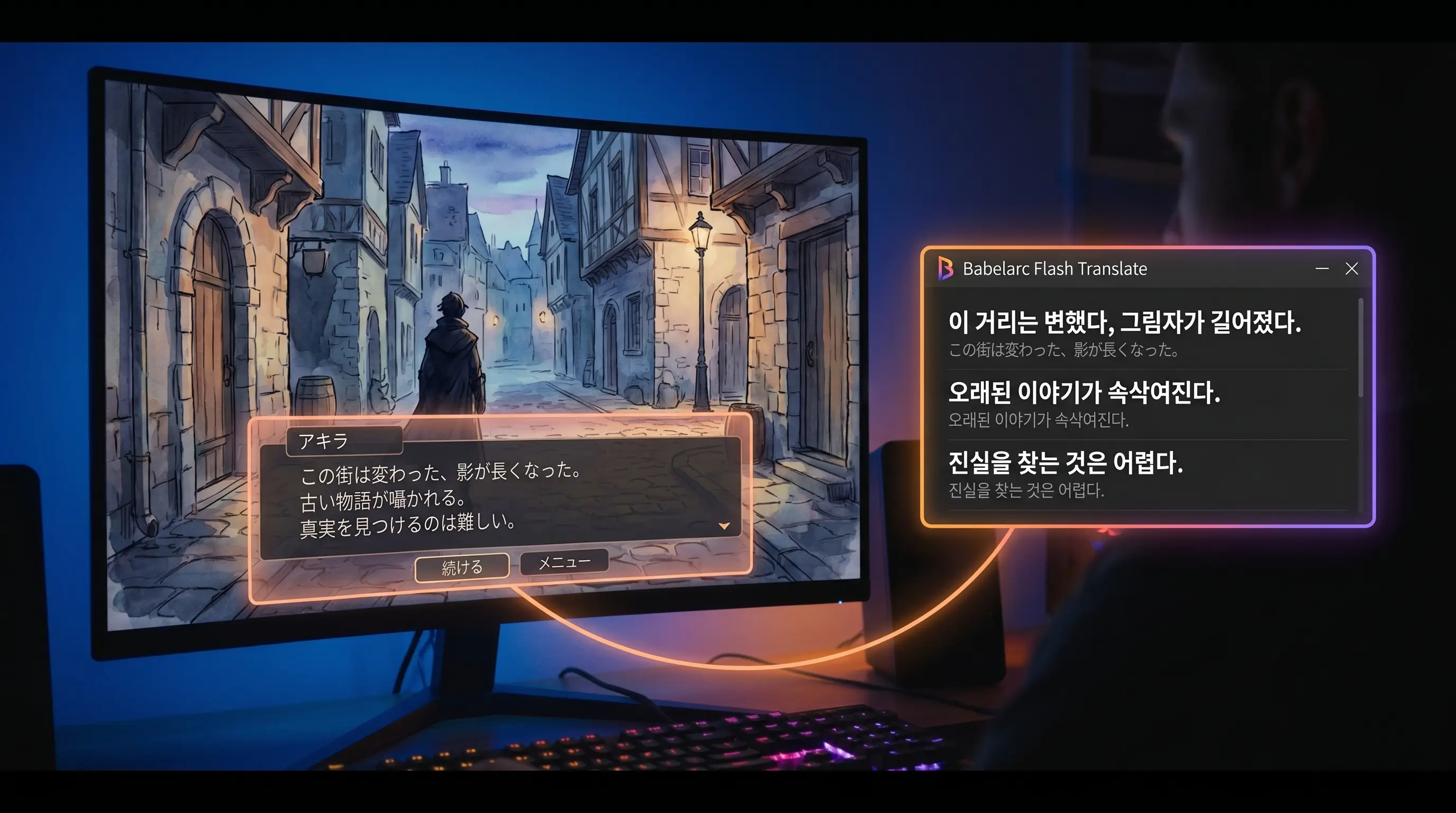
Japanese galgames · English interactive fiction · text adventures — Flash Translate snaps any dialogue box; Chat-Box Translate hooks onto the script panel for hands-free reading.
↓ Download Babelarc · No installerWhy VN / galgame players run Babelarc
Playing a VN or galgame in a foreign language has two pieces blocking you: you can't follow the dialogue and story, and you can't read the menus, choices, and item descriptions. Babelarc cracks both with two text tools —
Flash Translate — drag, get a translation. Ctrl + Alt + S, drag a rectangle over a VN dialogue box, menu choice, item tooltip, walkthrough screenshot — translation lands instantly. Read, close, done. Typical response 1-2 seconds.
Chat-Box Translate — script panel hooked, hands-free reading. VN dialogue is continuous, so tapping Flash Translate every line gets old fast. Frame the dialogue box region once, flip auto-translate on, Babelarc samples it in a loop. New dialogue appears, Babelarc translates and shows the translation in a small floating window beside the original. Click to next line, glance at the translation, keep reading.
Why not wait for fan patches or official translations? Official translations land months or years after the Japanese release. Fan patches can break version compatibility, corrupt saves, or simply not exist for the title you want. Babelarc lets you read the original day one — no patches, no broken saves, no fan-translation maintenance.
Tools for VN scenarios
Flash Translate (Ctrl + Alt + S) — drag once, translate once
The VN player's go-to. Tap the hotkey, drag a rectangle over anything on screen (dialogue box, menu, choice button, item tooltip, walkthrough image). Babelarc reads the text and surfaces a translation in a floating window. Read, close, done. Typical response 1-2 seconds.
Chat-Box Translate (Ctrl + Alt + A) — script panel hooked for hands-free reading
VN dialogue is continuous, so tapping Flash Translate every line gets old fast. Frame the dialogue box region once, flip auto-translate on, Babelarc samples it in a loop. New dialogue appears, Babelarc translates and shows the translation in a small floating window beside the original. Click to next line, glance at the translation, keep reading.
Typical VN workflow: Flash Translate early to learn menu wording → switch to Chat-Box Translate during the main story → return to Flash Translate for the occasional item description, system menu, or walkthrough lookup.
Supported VNs / interactive fiction
Babelarc uses screen-region OCR, so the VN engine and distribution platform don't matter — if the game runs on Windows and the text is visible, Babelarc works. Common types:
| Type | Examples | Flash Translate | Chat-Box Translate |
|---|---|---|---|
| Japanese commercial galgames | Yuzu Soft / Key / Type-Moon / Frontwing titles | ✅ | ✅ |
| Japanese doujin galgames | Comiket releases / DLsite indie titles | ✅ | ✅ |
| Western IF / VN | Disco Elysium / Sunless Sea / 80 Days / Choice of Games | ✅ | ✅ |
| Korean VN / Otome | Korean indie VN / Steam Korean otome | ✅ | ✅ |
| Chinese indie VN | Steam Chinese-language VN scene | ✅ | ✅ |
| Steam Visual Novel category | any title tagged "Visual Novel" on Steam | ✅ | ✅ |
| Steam Otome category | any otome title on Steam | ✅ | ✅ |
| Japanese text adventure (ADV) | Steins;Gate / 428 / Ever17 / Zero Escape series | ✅ | ✅ |
| Interactive Fiction (Twine / Inform) | itch.io IF works | ✅ | ✅ |
Babelarc doesn't depend on the VN engine (Ren'Py / Kirikiri / TyranoBuilder / NVL Maker / custom engines — any of them work). It only reads the text shown on your screen.
How VN readers actually use Babelarc
Scenario 1 · A Yuzu Soft new release in Japanese
The Yuzu Soft title you've been waiting on releases in Japanese; the English translation lands in about a year. Open Flash Translate, launch the game, frame the title menu — instant English translation. Once you know the UI wording, drop into the main story and switch to Chat-Box Translate, frame the dialogue box, auto-translate on. Dialogue auto-follows as you click. Hit Ctrl + Alt + S occasionally for system menus or item descriptions.
Scenario 2 · Disco Elysium in English (or in your second language)
Disco Elysium's text volume is huge, and your English is functional but reading novel-level prose is taxing. Open Chat-Box Translate, frame the dialogue panel, auto-translate on. The narrator text translates to your native language as it appears. You focus on the story and the choices, not on parsing dense prose. The skill voices and dialogue boxes get translated as they switch in — immersive reading of the best-narrated RPG in years.
Scenario 3 · Steins;Gate in Japanese
You want to read Steins;Gate in the original Japanese for the authentic narrative texture, but your reading speed for novel-density Japanese isn't quite there. Hook Chat-Box Translate on the dialogue panel, Babelarc auto-translates each line. Phone Trigger choices? Snap them with Flash Translate. You stay in the story's pacing, you don't miss flag triggers, and you reach the true ending without grinding through walkthroughs.
FAQ
- Is Flash Translate fast enough for VN reading pace?
- Typical 1-2 second response. VN reading is self-paced — you finish a line, click for the next, the brief moment for translation fits naturally into the reading rhythm and is barely noticeable.
- Does Chat-Box Translate keep up with the story pace?
- Yes. VN dialogue between clicks already includes a natural reading pause — Babelarc samples and translates as new lines appear, near-instant from the reader's perspective. Auto-advance modes (most modern VNs have them) also work as long as text sits on screen for about a second.
- How well does translation handle VN slang, otaku idiom, and character honorifics?
- Common VN-circle vocabulary, otaku culture references, honorifics (おにいちゃん / 先生 / etc.), and pop-culture borrowings tend to translate fine. For sharper accuracy, switch to Quality tier in settings and add the current app name to the Translation Enhancement field — that gives the translator extra context and produces noticeably better results.
- Does Flash Translate work in fullscreen VNs?
- Borderless windowed mode is recommended — that lets Babelarc's floating window display on top of the VN. Exclusive fullscreen blocks screen-overlay layers in some titles. Most modern VNs and galgames support windowed mode.
- Do special characters like 「」 「、」「…」 in VN text translate cleanly?
- Yes. Those are standard Japanese / Chinese / Korean punctuation; Babelarc handles them normally during translation. Special line breaks, ruby (furigana) annotations, and similar formatting get reorganised to the equivalent expression in the target language.
- If a fan patch exists for the title, do I still need Babelarc?
- Depends on what you need. Fan patches often take months or years to land, require an exact game version, and may have inconsistent quality / abandoned maintenance / conflicts with updates. Babelarc keeps you off third-party patches, free from version compatibility checks, and able to play the latest release immediately. You can also pair the two — fan patch for the main playthrough, Babelarc Flash Translate for anything the patch missed.
- Can I save Babelarc's translations as guides or for fan creations?
- Yes. Flash Translate's output is text in a floating window — you can copy-paste it. Chat-Box Translate's translation panel also supports copying. To save a longer scene, copy as you read.