Babelarc vs Live-Stream Caption Extensions — Hear the Streamer vs Translate Platform Captions
Browser caption extensions translate the platform's caption track — caption-dependent, browser-bound. Babelarc Live Interpret listens to what the streamer says and translates it live, cross-platform, cross-app, and works streamer-side too. Here's the 5-second decision tree.
↓ Download Babelarc · No installerWhat live-stream caption extensions are — in-browser caption translation
Live-stream caption translate extensions (browser plugins for translating Twitch / YouTube live captions) are extensions installed in your browser. The core approach is to grab the caption track or chat text from the streaming platform's page and overlay a translation on the web page. For viewers watching in a browser it's handy: install once, captions auto-translate on supported platforms.
For pure browser viewers, caption extensions have their conveniences:
- Zero extra software — just a browser extension, lightweight.
- Translation overlays on the page — in the same browser window as the stream.
- Out-of-the-box on supported platforms — walk in and it works on integrated platforms.
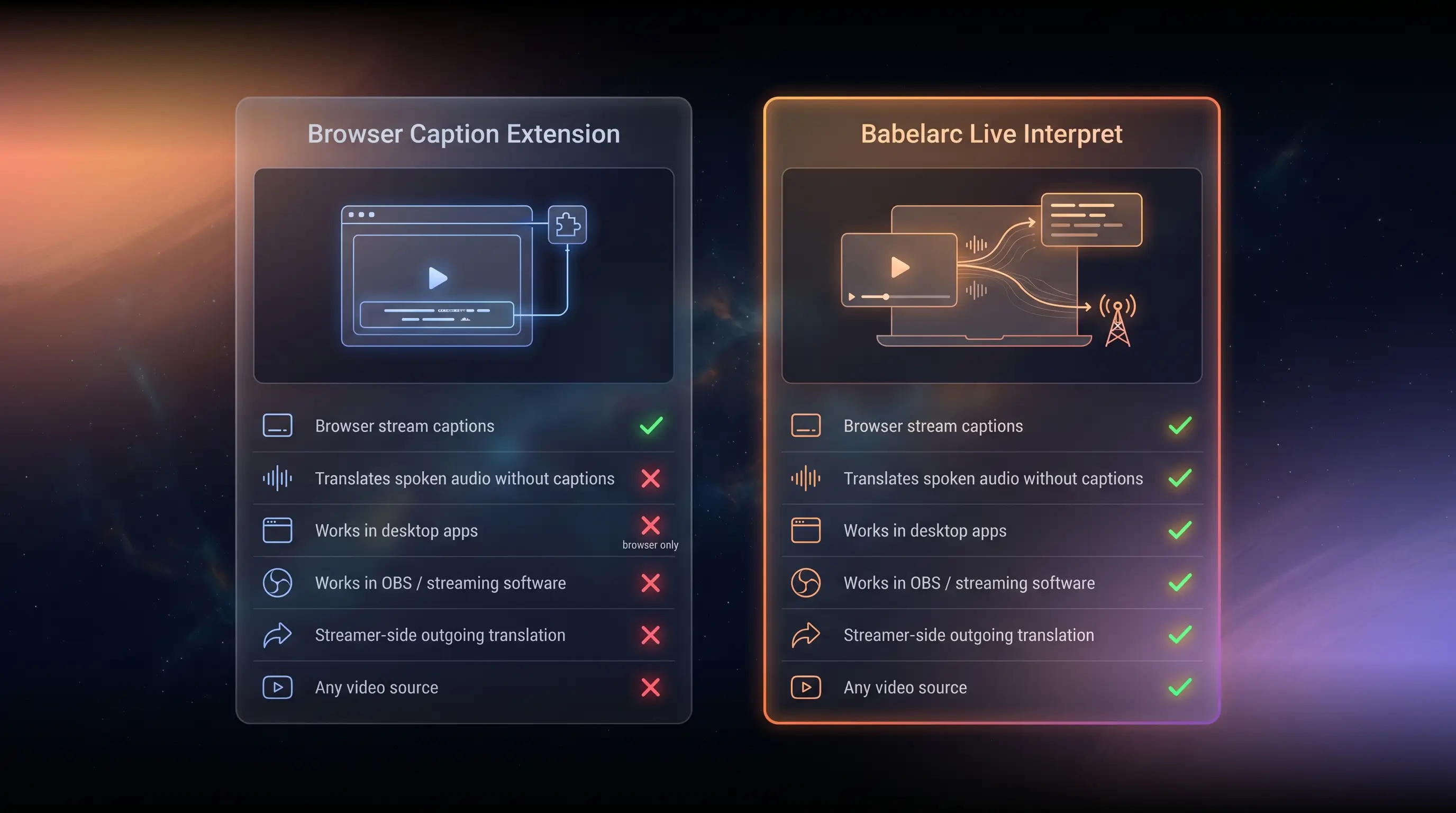
But caption extensions have three structural boundaries: ① they depend on the platform/streamer having a caption track (many streams have captions off, or auto-captions of poor quality, leaving the extension nothing to translate), ② browser-only, integrated-platform-only (desktop clients like the Twitch app, OBS, other video sources are all out of reach), and ③ viewer-side only (a streamer wanting to translate for their foreign-language viewers gets no help from an extension).
Core difference — listen to audio vs translate captions
The most fundamental difference between Babelarc and a live-stream caption extension is the translation input source:
Caption extension = translates the platform caption track
- Input is the caption text on the page; no captions on / not generated = nothing to translate.
- Browser-only, integrated-platform-only — desktop clients / OBS / local video all unreachable.
- Viewer-only.
Babelarc Live Interpret = listens to audio, translates what the streamer says
- Translates the stream's sound in real time, independent of whether the platform has captions — the moment the streamer speaks, it translates.
- Client-side, listens to any app's audio: browser streams, Twitch / YouTube desktop apps, streams inside Discord, local video, any window that makes sound.
- Translation shows in a floating window; immersive viewing, no window switch.
- Works streamer-side too — translate foreign viewers' voice / co-stream audio live, run a cross-language broadcast.
The key insight: a caption extension is a "translate existing captions, browser-bound, viewer-only" solution; Babelarc is a "listen to audio, translate the original speech, cross-app, viewer + streamer" solution.
Babelarc vs live-stream caption extension — full feature comparison
| Capability | Caption extension | Babelarc |
|---|---|---|
| In-browser stream caption translation | ✅ Core feature | ✅ Live Interpret / Flash Translate both cover it |
| Translates with no captions (listens to audio) | ❌ Depends on platform caption track | ✅ Live Interpret listens to audio |
| Desktop client streams (Twitch app, etc.) | ❌ Browser only | ✅ Listens to any app's audio |
| Inside OBS / streaming software | ❌ | ✅ Client-side listening |
| Streamer-side: translate for foreign viewers | ❌ Viewer-side only | ✅ Hear viewers' voice + Cross-Language Mic |
| Any video source (local / VOD) | ❌ Streaming platforms only | ✅ If it makes sound, it translates |
| Chat / comment translation | ⚠️ Some extensions support it | ✅ Chat-Box Translate |
| Consistent cross-platform experience | ⚠️ Each platform needs separate support | ✅ Audio / screen based, platform-agnostic |
| Price | Mostly free / some subscriptions | Free tier + subscription plans |
The table tells the story: a caption extension is a browser-bound, caption-dependent viewer-side tool; Babelarc is a listen-to-original-audio, cross-app, viewer + streamer client tool. For browser viewing of captioned streams the extension is light and sufficient; for streams without captions / desktop-app viewing / being a streamer yourself, the places a caption extension can't reach, Babelarc covers all of it.
Which one fits which scenario
Pick a caption extension when
- You only watch captioned streams in a browser — captions on, platform supported, the extension is light and sufficient.
- You don't want to install desktop software — a browser extension is the lightest option.
- You only need caption text / chat translation — exactly what the extension does.
Pick Babelarc when
- The streamer has no captions / poor captions — Live Interpret listens to the streamer's speech directly, no reliance on platform captions.
- You watch via desktop app / OBS — Twitch / YouTube desktop clients, OBS monitoring; browser extensions can't reach those, Babelarc listens to the audio.
- You watch overseas VTubers / AfreecaTV broadcasts — cross-platform; Babelarc goes by audio, platform-agnostic.
- You stream cross-language yourself — hear foreign viewers' voice + Cross-Language Mic lets foreign viewers hear you in their language; caption extensions only serve the viewer side.
- You want one tool across streams + games + VN + Discord — the extension is browser-stream-only, Babelarc is all-scenario.
Multi-scenario switchers
For browser viewing of captioned streams an extension works, but no-caption streams, desktop-app viewing, VTuber broadcasts, and streaming yourself go to Babelarc. You can pair them — extension for captioned browser streams, Babelarc for original audio / cross-app / streamer-side.
Streamer-side: where caption extensions are entirely absent
A live-stream caption extension is a viewer-side-only tool — it helps you (the viewer) read the streamer's captions. But if you're a streamer who wants foreign viewers to understand you, or wants to understand foreign viewers' co-stream audio, a caption extension does nothing.
Babelarc fills that gap on the streamer side:
- Hear foreign viewers' voice co-stream — Live Interpret translates a co-streaming viewer's foreign speech for you in real time; cross-language co-streams aren't awkward.
- Let foreign viewers hear you in their language — Cross-Language Mic translates your speech into target-language voice routed into OBS / streaming software's audio; foreign viewers hear their own language.
- Translate foreign viewers' chat — Chat-Box Translate follows the chat panel automatically so you see what foreign viewers are saying.
That's why, for a streamer who wants to broadcast cross-language, Babelarc isn't a "better alternative" to a caption extension — it covers a streamer-side dimension caption extensions don't have at all.
FAQ
- I watch streams in a browser and a caption extension works well. Why switch to Babelarc?
- You don't have to. For browser viewing of captioned streams, an extension is light and sufficient. Babelarc fills the scenarios it can't reach: streamers with captions off (nothing for the extension to translate), desktop-app / OBS viewing, cross-platform VTuber / AfreecaTV broadcasts, or being a streamer yourself. The extension can't touch those; Babelarc listens to the audio and translates anyway.
- Which has lower latency, Babelarc Live Interpret or a caption extension?
- A caption extension translates existing caption text: the streamer speaks → the platform generates a caption → the extension translates, and the platform's caption generation itself adds delay. Babelarc Live Interpret listens to the audio directly and starts processing the moment the streamer speaks, with typical latency in the real-time range. Both have their own pipeline limits, but Babelarc doesn't wait for the platform to generate captions first.
- The streamer has no captions at all — is the caption extension useless then?
- Yes — a caption extension depends on the platform/streamer having a caption track; no captions means nothing to translate. That's exactly Live Interpret's strength — it listens to the streamer's speech and translates directly, no captions required.
- I want to stream cross-language so foreign viewers understand me. How does Babelarc help?
- Use Cross-Language Mic: you speak English, Babelarc translates into target-language voice routed via a virtual microphone device into OBS / streaming software's audio, so foreign viewers hear their own language. Add Live Interpret for foreign viewers' co-stream voice and Chat-Box Translate for foreign chat — a full cross-language streaming setup. Caption extensions can't do any of this.
- Is Babelarc a browser extension?
- No. Babelarc is an independent desktop client tool, not a browser extension. It doesn't inject the browser or scrape page DOM. It's client-side: Live Interpret listens to system audio, Flash Translate / Chat-Box Translate read the screen via OCR. So it's platform-agnostic and browser-agnostic — desktop apps / OBS / local video all work.
- Does Babelarc cost money?
- Free to sign up and use — the energy granted at registration covers everyday use; for heavier use you can upgrade to a subscription plan (see the pricing page for details). Energy is shared across all features.