Babelarc vs DeepL Voice — Let Them Hear vs Let Them Read
DeepL Voice (2024) translates speech into captions — they read your translation. Babelarc Cross-Language Mic translates speech into synthesized voice — they hear you in their language. Two paths, two scenarios.
↓ Download Babelarc · No installerWhat DeepL Voice is — caption-direction voice translation
DeepL Voice is DeepL's 2024 voice-translation product line, with two sub-products:
- DeepL Voice for Meetings — for Microsoft Teams / Zoom: speakers' speech is translated to real-time caption text displayed on screen. Participants read the translation.
- DeepL Voice for Conversations — for phone face-to-face: the other party's speech is translated to caption text on your phone screen. Same caption pattern.
Both products use DeepL's well-regarded translation models and are popular for cross-language enterprise meetings and cross-cultural business communication.
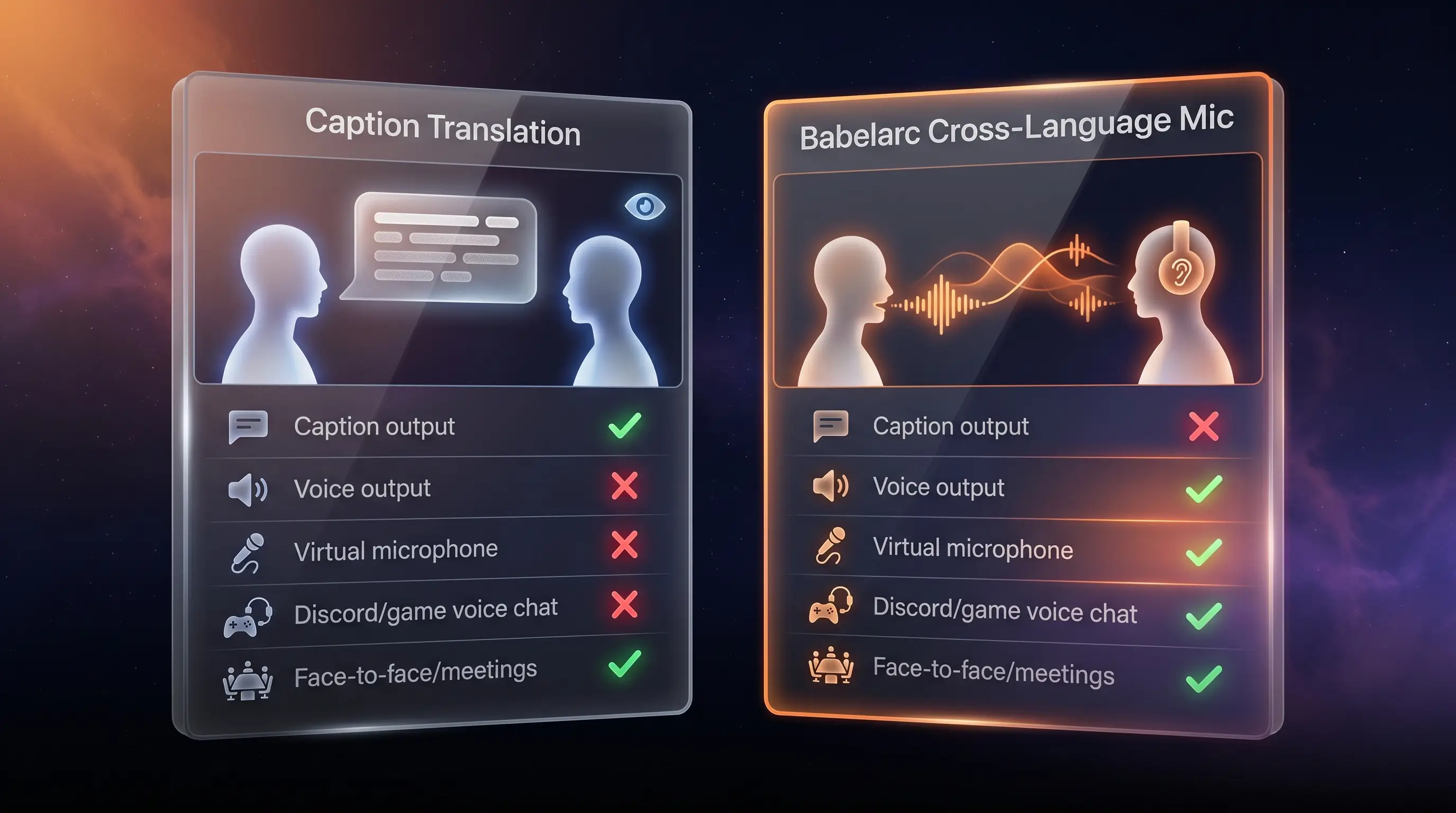
The defining stance — DeepL Voice outputs captions, not synthesized speech. The other party reads your translation; they don't hear you in their language. This is fundamentally different from gamer Discord voice scenarios.
Core difference — let them HEAR the target language
Babelarc Cross-Language Mic goes the other way: you speak English (or your native tongue), Babelarc translates in real time into the target language (JA / KR / ZH / etc.), then outputs synthesized voice in the target language through a virtual microphone device into the game / Discord / Teams / Zoom mic input. The other party hears fluent target-language speech, not captions.
Scene-level contrast:
- DeepL Voice → they hear your original speech while reading the screen caption. Fine for boardrooms and video meetings.
- Babelarc Cross-Language Mic → they hear only target-language voice, no caption to read. In Discord voice chat or cross-language gaming party calls, it feels like you natively speak their language.
This isn't a "which is better" question — they're two tools designed for two completely different scenarios.
Babelarc vs DeepL Voice — full feature comparison
| Capability | DeepL Voice | Babelarc |
|---|---|---|
| Primary battleground | Teams / Zoom meetings, phone face-to-face | Discord voice, party calls, gamer scenarios |
| Translation output format | 📝 Caption text (they read) | 🔊 Synthesized target-language voice (they hear) + Live Interpret to hear them |
| Virtual microphone output | ❌ | ✅ Plugs into Discord / game / Teams mic input |
| Desktop text translation / OCR | ❌ | ✅ Flash Translate + Chat-Box Translate |
| Cross-language voice in (hear them) | ✅ Caption direction | ✅ Live Interpret (caption) + Cross-Lang Mic (voice direction) |
| Meeting caption use case | ✅ Home turf, native Teams / Zoom integration | ⚠️ Live Interpret usable but not meeting-optimised |
| Discord voice chat use case | ⚠️ Can't make the other side hear target language | ✅ Cross-Language Mic purpose-built |
| Supported platforms | Teams / Zoom / iOS / Android | Windows desktop |
| Price | Limited free tier + DeepL Pro subscription | Free tier + subscription plans |
The table tells the story: DeepL Voice is the meeting / business caption translation king; Babelarc is the cross-language gamer voice translation king. They overlap on the "hear them" caption direction, but Babelarc's "let them hear the target language" voice direction has no DeepL Voice counterpart.
Which one fits which scenario
Pick DeepL Voice when
- Cross-language enterprise meetings (Teams / Zoom) — DeepL Voice for Meetings integrates natively, captions render in real time, fits formal meetings.
- Face-to-face business / travel conversations (phone) — DeepL Voice for Conversations means you hold up your phone and the caption appears.
- You need a written meeting transcript — DeepL Voice's output is text, naturally preserved as meeting minutes.
Pick Babelarc when
- Discord voice with foreign friends — Cross-Language Mic lets them hear you in their language. In-game they don't have to read a caption while playing.
- Foreign-server MMO party chat in combat — no spare focus for reading captions; voice translation lands faster than captions can be parsed.
- Watching foreign-language streams / VTubers — Live Interpret translates the streamer's voice into one you can follow; immersive viewing, no window switch.
- All desktop gamer scenarios — VN reading / stream viewing / team voice / streaming, Babelarc's four tools cover everything.
Multi-scenario switchers
You run cross-border Teams meetings on weekdays + Discord voice with overseas friends in the evening + chew through a Japanese VN on the weekend — two tools, two scenarios: DeepL Voice for work, Babelarc for play. No conflict.
Why 'voice output' matters so much for gamer scenarios
Gaming scenarios differ from meeting scenarios on three fundamental axes, and these three differences are why a caption-direction tool like DeepL Voice falls short in gamer scenarios:
- A gamer's eyes are on the game, not on captions — staring at captions during combat = wipe the team. MMO / FPS / MOBA all the same. Voice output lets your teammates hear you instead of read you, so they keep their focus on the game.
- Cross-language party chat needs instant reaction — captions need parsing before a reaction can fire; voice triggers reaction directly. That 0.5-second delta is the difference between winning and losing a round in Apex / Valorant.
- Gaming social is "voice" social — when you're 1-on-1 in Discord with a foreign friend, hearing their laughter / tone / pacing IS the social interaction. Captions are cold text that strip the social layer. Cross-Language Mic preserves your voice → translates into their language → they hear you "speak," with tone and pacing intact.
This is why Cross-Language Mic is Babelarc's signature move — in gamer scenarios, this single feature creates an experience caption-direction tools simply cannot deliver.
FAQ
- DeepL Voice integrates with Teams / Zoom natively. Can Babelarc Cross-Language Mic also work in Teams / Zoom?
- Yes. Babelarc Cross-Language Mic outputs through a virtual microphone device — any app with a mic input selector (Teams / Zoom / Discord / games) can pick it up. Just select the Babelarc virtual device in the app's mic settings.
- DeepL is famous for translation quality. How does Babelarc Cross-Language Mic compare?
- Babelarc uses advanced AI translation, with a selectable Quality tier. Common pairs (English / Japanese / Korean / Chinese / French / German) all read close to native expression; switch to Quality tier when you want extra accuracy.
- Does the synthesized voice sound natural? Or does it sound robotic?
- Babelarc uses modern neural TTS engines. English / Japanese / Korean / Chinese and other mainstream languages all sound natural, close to human speech. The other party can carry on a normal conversation without feeling they're talking to a bot.
- Does my tone / cadence carry over? Or does it become flat machine speech?
- Cross-Language Mic carries the semantics of your speech; tone / cadence comes from TTS synthesis. Today fine-grained tone reproduction isn't 100% — but synthesized voice already has natural prosody. If you speak excitedly / laugh / get serious, the translated target-language voice still carries meaning + pacing; the other party clearly feels the conversational atmosphere.
- What's the difference between DeepL Voice and Babelarc Live Interpret? Both translate the other party's speech.
- Technically similar; the difference is the battleground: DeepL Voice for Meetings integrates natively with Teams / Zoom and optimises caption rendering for meeting context; Babelarc Live Interpret listens to any app's audio (Twitch streams / desktop Discord / in-game voice / VTuber broadcasts) and shows translation in a floating overlay. Each fits a different scenario best.
- Can I use both?
- Absolutely. Recommended: work cross-border Teams / Zoom meetings → DeepL Voice; gaming / Discord voice with foreign friends → Babelarc.
- What's Cross-Language Mic's latency like? Can it keep up with combat?
- Typical 1-2 seconds (speech → synthesized target-language voice output). Casual game chat / cross-language party calls keep pace; competitive twitch scenarios (Valorant / Apex tactical callouts) work best with pre-agreed short phrases; long-sentence translation has slight delay, which is the physical limit shared by all real-time translation tools.